Zapier vs Make vs n8n (and More): The Best Automation Tool for Small Business in 2025
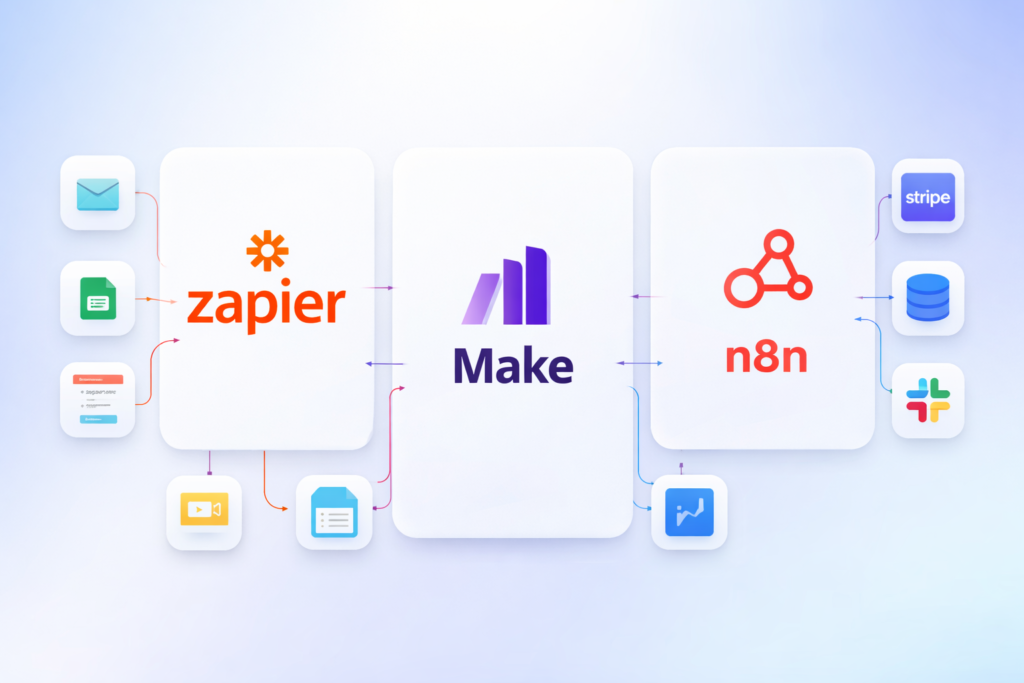
Automation tools help you connect your apps and run workflows automatically—so you stop wasting time on copy-paste tasks like moving leads from a form to a CRM, sending follow-up emails, creating invoices, or posting updates to Slack.
But “automation tool” can mean different things depending on your business:
- Some teams want the easiest tool that “just works.”
- Others want advanced control and complex branching logic.
- Some want low cost at scale.
- And technical teams sometimes want self-hosted automation for privacy and flexibility.
In this guide, we compare the best automation platforms for small businesses in 2025, with a deep dive into each tool—so you can choose the right one without overpaying or getting stuck with limitations.
Quick Summary (Comparison Table)
| Tool | Best for | Ease of use | Integrations | Pricing style | Standout strength |
|---|---|---|---|---|---|
| Zapier | Most businesses & beginners | ⭐⭐⭐⭐⭐ | ⭐⭐⭐⭐⭐ | Usage-based | Huge app library + simplicity |
| Make | Advanced no-code workflows | ⭐⭐⭐⭐☆ | ⭐⭐⭐⭐☆ | Usage-based | Visual builder + powerful logic |
| n8n | Self-hosting + customization | ⭐⭐⭐☆☆ | ⭐⭐⭐⭐☆ | Self-host / cloud | Control, privacy, flexibility |
| Pabbly Connect | Budget-friendly automation | ⭐⭐⭐☆☆ | ⭐⭐⭐☆☆ | Often value bundles | Cost-effective at scale |
| Integrately | Fast templates + simple flows | ⭐⭐⭐⭐☆ | ⭐⭐⭐☆☆ | Plan-based | 1-click automations |
Pricing note: automation tools change pricing often. Use the pricing sections as “starting-point guidance,” then confirm current numbers on the official pricing pages before you buy.
How to Choose the Right Automation Tool
Before picking a platform, decide what matters most:
- Integrations you actually need
Make a short list: Gmail, Google Sheets, WordPress, HubSpot, Mailchimp, Stripe, Slack, etc. The “best” tool is useless if it can’t connect your key apps. - Workflow complexity
- Simple = “If form submitted → add to CRM → send email”
- Advanced = branching logic, routers, error handling, data transformations, multi-step approvals
- Volume
If you run thousands of actions/month, costs can rise. Pick a tool that scales economically. - Reliability and visibility
Look for good logs, error alerts, and retry behavior—automation fails silently if you don’t monitor it. - Hosting and privacy
If you must control data, consider self-hosted options like n8n.
1) Zapier

Overview
Zapier is the most well-known automation platform for connecting apps. It’s popular because it’s incredibly beginner-friendly: you choose a trigger, pick actions, and your “Zap” runs in the background.
For most small businesses, Zapier is the easiest way to automate everyday tasks without building custom code. It’s ideal for marketing, operations, and customer support workflows.
Key Features
- Massive integration library (apps + triggers/actions)
- Multi-step workflows
- Filters and basic logic
- Built-in “paths” (advanced branching on higher tiers)
- Webhooks (for more advanced use cases)
- Good task history and error visibility
Pros
- Easiest tool to start with
- Very large app ecosystem
- Stable, reliable, and widely supported
- Great templates and quick setup
Cons
- Can get expensive at high volumes
- Complex workflows may feel limiting compared to visual builders
- Some advanced features are locked behind higher plans
Pricing (summary)
Typically usage-based (tasks/actions per month) with tier upgrades for advanced logic and features.
Tip: Zapier is best value when your workflows are simple and stable.
Best for
Small businesses that want the fastest, simplest automation with wide app support.
Verdict
If you want automation that’s easy and reliable, Zapier is still the safest “default pick”—especially for non-technical teams.
2) Make (formerly Integromat)
Overview
Make is a powerful no-code automation platform with a visual “scenario” builder. It’s often chosen by users who outgrow Zapier’s simplicity and need more control: routers, iterators, data transformation, and complex logic.
If you like seeing exactly how data flows through your automation, Make’s interface is a big advantage.
Key Features
- Visual workflow builder
- Routers (branching), filters, and conditions
- Data transformation tools (formatting, mapping, parsing)
- Iterators/aggregators for handling lists
- Webhooks and advanced modules
- Better control for complex multi-step workflows
Pros
- Strong for advanced no-code automation
- Visual debugging makes complex flows easier to manage
- Often cost-effective for certain high-volume patterns
- Great for marketing ops and growth workflows
Cons
- Slightly higher learning curve than Zapier
- Some integrations may require more configuration
- You’ll spend more time building (but you get more control)
Pricing (summary)
Usually usage-based, often measured by “operations” and plan tiers.
Best value when you run complex workflows and want efficient execution.
Best for
Teams that need advanced workflows and want powerful logic without coding.
Verdict
Make is the best choice when you want more power than Zapier but still prefer no-code.
3) n8n
Overview
n8n is a workflow automation platform known for its flexibility, developer-friendly approach, and self-hosting option. You can run n8n on your own server (for more control and privacy) or use a hosted/cloud option depending on your setup.
If you have technical skills—or want a tool your developer can extend—n8n is one of the best long-term automation solutions.
Key Features
- Self-hosted deployment (great for privacy/control)
- Node-based workflow building
- Custom code steps (JavaScript) when needed
- Webhooks, API calls, and custom integrations
- Error handling and execution history
- Great for internal tools and data pipelines
Pros
- Powerful and flexible
- Self-hosting option can reduce long-term costs
- Great for custom workflows and APIs
- Strong for privacy-sensitive operations
Cons
- Not as beginner-friendly as Zapier
- Self-hosting requires maintenance (hosting, updates, security)
- Templates/integrations feel more “technical”
Pricing (summary)
- Self-hosted: costs depend on your server
- Hosted: typically tiered/usage-based
n8n can be very cost-effective if you run lots of workflows and can manage hosting.
Best for
Businesses that want control, technical flexibility, or self-hosted automation.
Verdict
If you have technical capacity (or a developer), n8n is a top-tier automation platform that can scale with you.
4) Pabbly Connect

Overview
Pabbly Connect is often chosen by small businesses that want a budget-friendly alternative to bigger automation platforms. It provides common integrations and multi-step workflows without the “premium pricing feel” some users experience elsewhere.
It’s particularly attractive if you expect volume to grow and you want to keep automation costs predictable.
Key Features
- Multi-step automations
- Common business app integrations
- Webhooks and API steps (depending on setup)
- Basic logic and filters
- Dashboard to monitor tasks/executions
Pros
- Often better value for high volume
- Solid core automation features
- Useful for SMB workflows on a tighter budget
Cons
- Integration library may be smaller than Zapier
- UI and workflow building can feel less polished
- Some advanced use cases may require workarounds
Pricing (summary)
Often positioned as cost-effective compared to bigger platforms, with plans aimed at SMB usage.
Best for
Small businesses that want lower cost automation without needing the most advanced builder.
Verdict
If budget matters and your automations are fairly standard, Pabbly Connect is a strong contender.
5) Integrately
Overview
Integrately focuses on speed: lots of ready-made automation templates so you can launch workflows quickly. If you don’t want to “design” automations and prefer choosing a proven recipe, Integrately can save time.
It’s best for straightforward workflows where templates cover most of your needs.
Key Features
- Large library of pre-built automation templates
- Quick setup for common app connections
- Simple multi-step flows
- Basic logic and monitoring
Pros
- Very fast to start
- Great for common workflows
- Simple interface for non-technical users
Cons
- Less flexible than Make for complex logic
- Integration depth varies by app
- Advanced workflows may hit limits
Pricing (summary)
Typically tier-based plans, sometimes easier to predict than complex usage systems.
Best for
Small teams that want to automate quickly using templates.
Verdict
If your workflows are standard and you value speed, Integrately is a good “get it done” tool.
Feature Comparison (Deeper Look)
| Feature | Zapier | Make | n8n | Pabbly | Integrately |
|---|---|---|---|---|---|
| Beginner-friendly | ✅✅✅✅✅ | ✅✅✅✅ | ✅✅ | ✅✅✅ | ✅✅✅✅ |
| Advanced branching logic | ✅ (higher tiers) | ✅✅✅✅✅ | ✅✅✅✅✅ | ✅✅✅ | ✅✅ |
| Self-hosting option | ❌ | ❌ | ✅✅✅✅✅ | ❌ | ❌ |
| Best for high-volume cost control | ⚠️ depends | ✅✅✅ | ✅✅✅✅ | ✅✅✅✅ | ✅✅ |
| Best template library | ✅✅✅✅ | ✅✅✅ | ✅✅ | ✅✅ | ✅✅✅✅ |
Recommended Workflows (Practical Examples)
Example 1: Lead capture automation
Landing page form → Google Sheets → CRM → Welcome email
- Best tools: Zapier / Make
- Add-on: use Automation category to route leads, tag by source, notify Slack
Example 2: E-commerce support automation
Shop order → create ticket → notify team → follow-up email
- Best tools: Make / Zapier
- Consider: error handling + retries
Example 3: Internal ops automation
Invoices, reporting, database sync, custom APIs
- Best tool: n8n (especially if self-hosted)
Final Recommendations (Best Picks)
Best for most small businesses
✅ Zapier — easiest onboarding + widest integrations.
Best for advanced no-code workflows
✅ Make — visual builder + powerful logic.
Best for self-hosting and maximum control
✅ n8n — ideal for technical teams and privacy needs.
Best budget-friendly option
✅ Pabbly Connect — great value for standard workflows at scale.
Best for “templates and speed”
✅ Integrately — quick setup for common automations.
FAQ ?
Q1: What is the best automation tool for a small business?
For most small businesses, Zapier is the easiest starting point because it’s simple and supports many apps. If you need advanced logic, Make is often a better fit.
Q2: Is Make better than Zapier?
Make is usually better for complex workflows and advanced data logic, while Zapier is better for beginners who want fast, reliable automations with minimal setup.
Q3: When should I choose n8n?
Choose n8n if you want self-hosting, privacy control, or advanced customization—especially if you have technical support or a developer.
Q4: Are automation tools worth the cost?
Yes—automation tools often save hours each week by removing repetitive tasks. Even one well-built workflow can pay for the tool if it prevents missed leads or delayed follow-ups.
Q5: How do I keep automations from breaking?
Use tools with good logs and alerts, test workflows monthly, avoid unnecessary steps, and add error handling (retries/notifications) for critical automations.
Q6: Can I automate lead routing from landing pages to a CRM?
Yes. Most automation tools can send form submissions to CRMs, tag leads by source, trigger email sequences, and notify your team instantly.
Pingback: ActiveCampaign vs Klaviyo (2026): Which Email Marketing Platform Is Better for Automation, Ecommerce & Growth?